
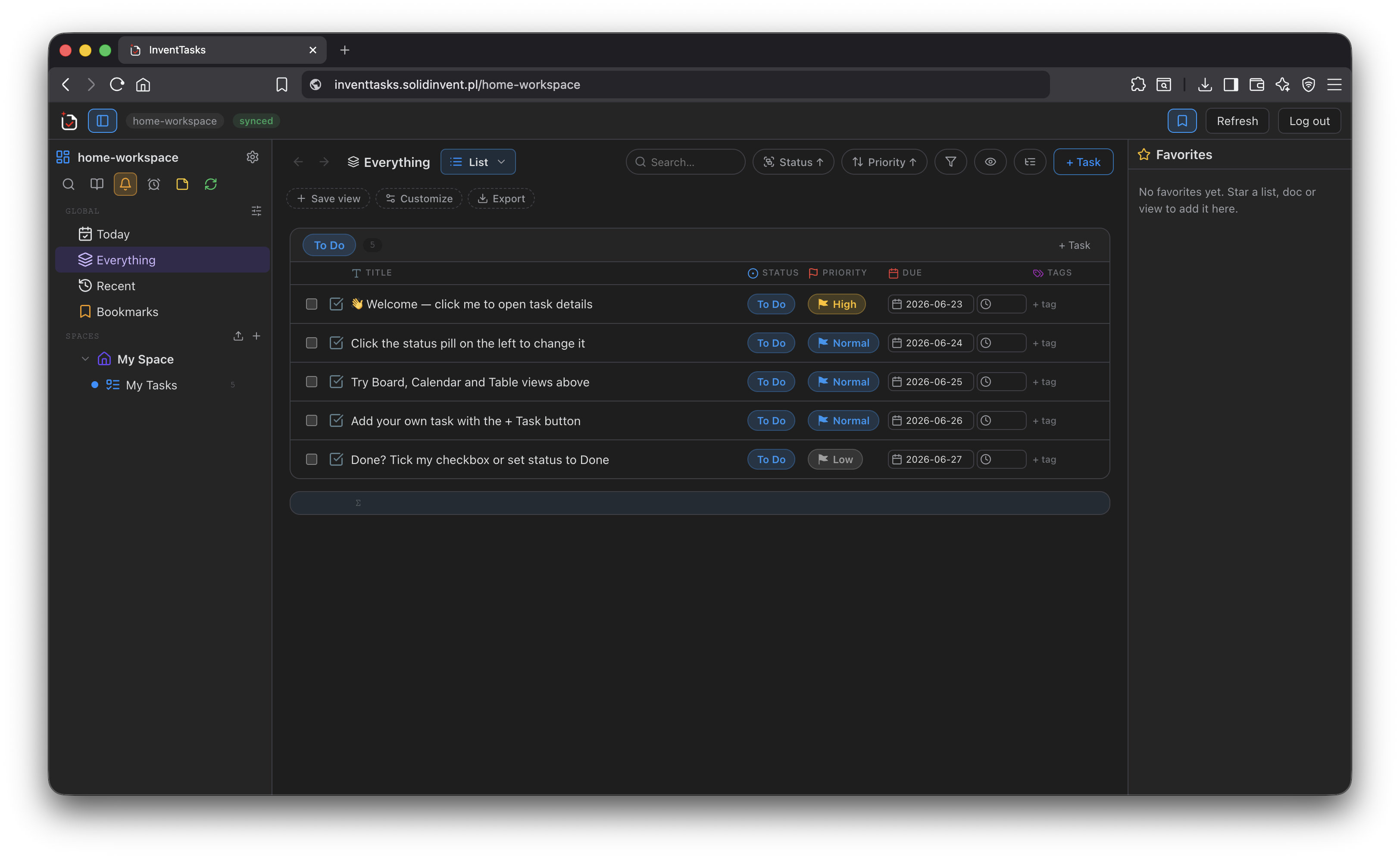
The InventTasks sync server is a small Docker container you run yourself. It keeps an Obsidian vault in step across your desktop, laptop and phone, retains file history so a bad edit is recoverable, takes scheduled backups, and serves a browser app that shows the same vault without Obsidian installed.
This is what people usually mean by free Obsidian sync: not a discount, not a limited tier, but the same job done on your own hardware.
It is free. Not a free tier of something paid — no seat count, no storage plan and no licence key to enter. The only thing it costs is the machine it runs on, which for most people is a Raspberry Pi, a NAS or a €4 VPS.
It does have a licence, and the licence says so in writing: free to run, any number of instances and users, company use included, no fee now or later. The source is not public, which is stated plainly there rather than left to be guessed.
The server now has its own site: sync.solidinvent.pl. This page answers the plugin owner's question — can InventTasks sync, and what does that cost. If you are here to run the server itself, the other site is written for that: deployment, the licence, and what the export gives you back.
What actually syncs#
Everything in the vault: notes, attachments, images, PDFs, and — if you want them — themes, snippets and other plugins' data. Two toggles decide how far it reaches:
| Option | Default | What it does |
|---|---|---|
Sync Obsidian settings (.obsidian) |
Off | Themes, snippets and supported app settings travel with the vault; per-device layout and caches stay local |
Sync community plugins (.obsidian/plugins) |
Off | Other plugins' code and data sync too |
| Excluded paths | — | One pattern per line: Archive/ skips a subtree, *.mp4 an extension |
Whole-vault sync does not require an InventTasks Pro licence. The free tier of the plugin is a complete sync client; a Pro licence governs task-manager capacity, nothing else.
What it costs, honestly compared#
Obsidian Sync is a good product and this is not a takedown. It is a paid service with real advantages, and the fair comparison says so.
| InventTasks sync server | Obsidian Sync Standard | Obsidian Sync Plus | |
|---|---|---|---|
| Price | Free (you provide the machine) | $4/mo billed yearly, $5/mo monthly | $8/mo billed yearly, $10/mo monthly |
| Vaults | Unlimited | 1 | 10 |
| Storage | Whatever the disk holds | 1 GB | 10 GB (100 GB upgrade available) |
| Max file size | 50 MB default, configurable to 1 GB | 5 MB | 200 MB |
| Version history | 30 days / 20 versions default, configurable to 10 years | 1 month | 12 months |
| Vault in a browser | Yes — read and edit, no Obsidian needed | — | — |
| REST API over your notes | Yes — OpenAPI 3.1, understands frontmatter | — | — |
| Maintenance | Yours | None | None |
| Support | Community | Official | Official |
Obsidian Sync pricing and limits checked on 2026-08-15 at obsidian.md/sync.
Where Obsidian Sync is the better choice#
Read this part before you decide.
- You do not want to run a server. Ours needs a machine that stays on, HTTPS, updates and a backup you have actually tested restoring. If that sentence sounds like a chore rather than a Saturday, pay the $4.
- You want official support. InventTasks is one developer. Obsidian Sync is the Obsidian team's own product, supported by them.
Where self-hosting wins#
- Cost at scale. One vault or twenty, 1 GB or 500 GB, one device or ten — the price does not move.
- File size. A 400 MB video in your vault syncs if you raise one setting.
- History depth. Keep a year of versions if the disk allows it.
- Your data stays on your hardware. Nothing is uploaded anywhere else, and no company can change its terms, pricing or availability underneath you.
- Two things a sync service does not do at all. Your vault opens in a browser, and it has an API. Details below — this is the part where the comparison stops being about price.
The server does not just move files#
A sync service copies bytes between devices. This one also reads them, and that difference is what the two rows above are about.
The web app parses your Markdown itself. It is not a file download with a viewer bolted on: it resolves wiki links, renders notes, edits them, and — when the vault holds an InventTasks workspace — draws the whole task manager from the same frontmatter the plugin uses. No Obsidian, no plugin, no install.
The REST API understands structure, not just paths. It addresses tasks,
docs and saved views by the stable IDs in their frontmatter, returns typed
fields with resolved labels, and writes changes back as ordinary Markdown that
syncs to your devices. A script can file a task from a webhook, a cron job can
close last month's recurring work, a dashboard can read your open items —
against your own server, with an OpenAPI 3.1 document and an interactive
console at /api-console.
Both are covered by the same free server. See the API guide and the REST API page.
The web app — the part people do not expect#
The same container serves a web app at /. Sign in and the entire vault opens
in the browser: the file tree, Markdown preview and editing, images, audio,
video and PDFs, wiki links, upload and download, and version history with
restore.
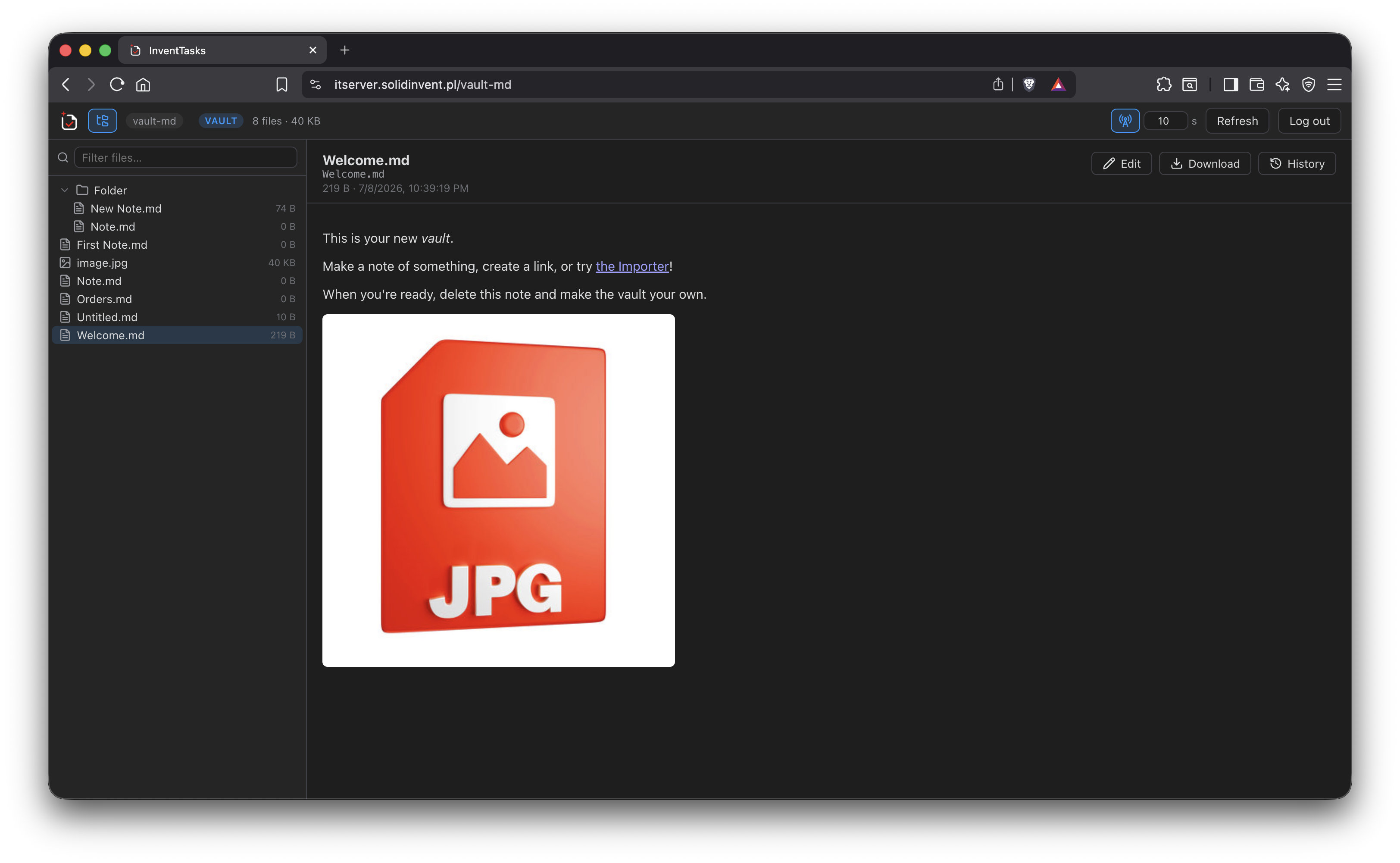
That means your notes on a locked-down work laptop, a borrowed machine or a phone browser — with no Obsidian and no plugin installed there. The pages come from your own server, so nothing passes through anyone else.
If the vault also holds an InventTasks workspace, the web app opens the full task manager too: List, Board, Calendar, Table, Gantt, Timeline and Docs, backed by the server copy and updating live as other devices change things.
Setting it up#
The deployment bundle contains a Docker Compose file, a Caddy configuration for HTTPS, backup scripts and a setup guide. In outline:
# 1. download and unzip the bundle
curl -LO https://inventtasks.solidinvent.pl/download/inventtasks-server.zip
# ...or from the GitHub release, which carries the same file:
# curl -LO https://github.com/solidinvent-dev/inventtasks/releases/latest/download/inventtasks-server.zip
unzip inventtasks-server.zip && cd inventtasks-server

# 2. set ADMIN_USER and ADMIN_PASSWORD in .env
cp .env.example .env && $EDITOR .env

# 3. start it
docker compose up -d
The image is multi-architecture, so the same command works on an x86 VPS and on
an ARM board like a Raspberry Pi or a Synology NAS. The container listens on
port 8480 and keeps everything under /data.
Then open the server in a browser, sign in, create a Vault object, copy the token it shows once, and enter it in the plugin under Settings → InventTasks → Vault sync. Repeat on every device with the same Vault ID.
The full deployment guide covers reverse proxies, backups, retention tuning, the mass-deletion guard and the REST API.
What happens when two devices disagree#
The newer modification time wins, and the version that lost is kept in server history rather than thrown away — so "wrong one won" is a restore, not a loss. You can also ask the plugin to write the losing copy next to the file locally.
If a pull would delete an unusual number of files — the classic symptom of a sync gone wrong — the server pauses and asks, offering to restore the server's files, accept the deletion, or decide later. It does not quietly empty your vault and call it a successful sync.
There is a quieter version of the same problem that most sync setups never
mention. Notes conflict visibly — you get a second copy and you fix it. Plugin
configuration in .obsidian/plugins/<id>/data.json conflicts silently: it is
rewritten in the background, one machine's version simply wins, and you find out
weeks later that half your settings came from the laptop. InventTasks keeps
shared workspace state in the vault as ordinary Markdown — _workspace.md,
_space.md, _list.md — so it travels the same road as your notes and
conflicts the same visible way. Only device-local settings and protected secrets
stay in data.json, which is exactly the part that should not travel.
If you ever want out#
The honest question about a self-hosted tool from a small vendor is what happens when the vendor stops. So here is the exit, and it is one command:
npm run export:readable -- ./data --out ./readable-export
It takes a backup — sync.db plus blobs/ — and writes an ordinary Markdown
vault that opens in plain Obsidian with no plugin installed. Spaces, folders
and lists become directories, every task becomes its own note, docs keep their
tree, attachments sit beside the notes that use them, and links stay links.
Deleted tasks and version history land in _history/ rather than disappearing,
and any field the exporter does not recognise is written out under its own
heading instead of being dropped.
Nothing about that depends on this project still existing. It is a script over a SQLite file and a folder of blobs, both of which are already on your disk.
Requirements#
- A machine that can run Docker and stays reachable from your devices
- The InventTasks plugin on each device, free tier is enough
- HTTPS if traffic leaves your own network — the bundle ships a Caddy config that obtains a certificate automatically