
"Obsidian calendar plugin" describes at least four unrelated things: a sidebar for jumping between daily notes, an event calendar, a timeline of today, and a calendar view over arbitrary notes. People compare them as if they were competing, then install two and wonder why neither does what they wanted.
Everything below was checked against release history in September 2026, because reputation in this ecosystem lags reality by years. This page is written by someone who sells a task plugin with a calendar view; that part is at the bottom, clearly marked.
Calendar — a sidebar for daily notes#
The classic. A small month grid in the sidebar; click a day to open or create its daily note, with dots showing writing activity. Over 3 million downloads, which makes it one of the best-known plugins in Obsidian.
It is not an event calendar and never claimed to be. Nothing with a due date appears on it.
Worth knowing: its last release is 2.0.0-beta.2 from April 2021, and
the repository's last commit is from mid-2024. It still works, and for something
this simple that matters less than it would elsewhere — but five years without a
release is a fact, not a rumour. Weekly notes moved out to the separate Periodic
Notes plugin long ago.
Full Calendar — the event calendar#
The one people mean when they say they want a real calendar: events as notes with frontmatter, a week and month grid, and read-only ICS and CalDAV feeds so work or family calendars appear alongside them.
Worth knowing: it is archived. The repository now sits under a
community-archive organisation and its last release, 0.10.7, is from
April 2023. It still installs and still runs for many people, but nothing is
coming — no fix, no compatibility update. Building a year of scheduling on it is
a decision, not a default.
Day Planner — the timeline of today#
A different job again: it turns a daily note into an editable timeline you can drag blocks around in, pulls in ICS feeds from Google, iCloud or Outlook, reads tasks from the Tasks plugin, and can plan across several days.
Worth knowing: it is the actively maintained one here. Latest release
0.35.1 from July 2026, with commits and issue triage still happening.
Around 874 000 downloads.
If you want time-blocking — deciding when today you will do things — this is the current answer, and it is not close.
Bases plus a calendar view — the new option#
Obsidian shipped Bases as a core plugin: turn a set of notes into a database view, maintained by the Obsidian team, no install needed. It has table, card, list and map views but no calendar of its own.
Community plugins now add one. Calendar Bases renders a Bases view as a calendar built on FullCalendar, with drag-and-drop rescheduling that writes the new date straight back into the note's frontmatter. It needs Obsidian 1.10 or later.
This is the newest and least-known option, and for "show me my notes that have dates" it is increasingly the sensible one — the foundation is core software rather than a single volunteer's evenings.
Which one you want#
| If your problem is | Use |
|---|---|
| Jumping between daily notes | Calendar, keeping its age in mind |
| Planning the hours of today | Day Planner — maintained, and built for exactly this |
| Notes with dates, shown on a month grid | Bases plus a calendar view |
| Events with ICS feeds, in Obsidian | Full Calendar, knowing it is archived |
| Tasks with due dates, that you also want to reschedule, group and filter | read on |
Where this plugin fits — the biased part#
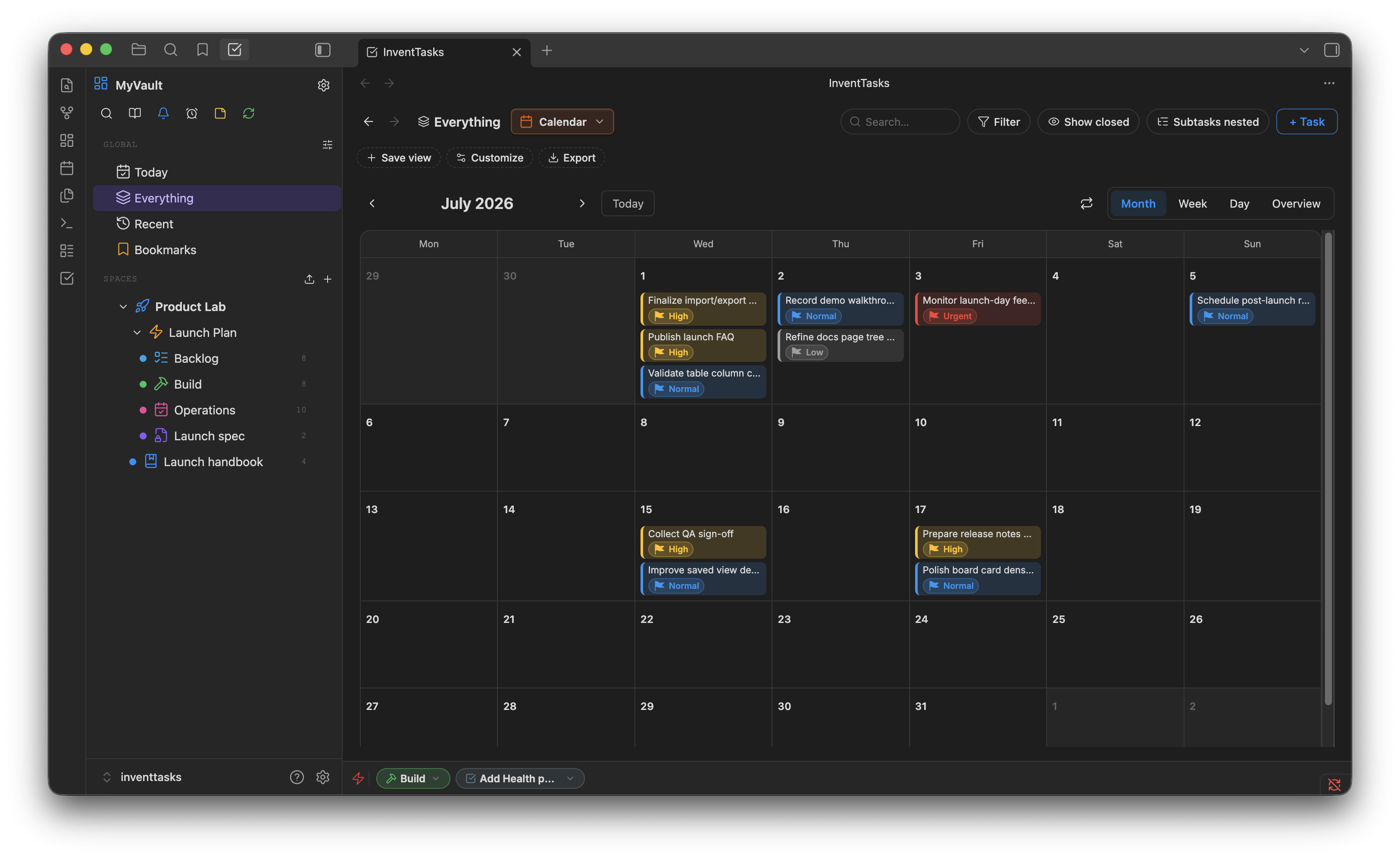
In InventTasks the calendar is not a separate thing that reads your notes. It is one of six views over the same tasks — the same objects you see in the list, the board, the Gantt chart and the timeline — so dragging a task to another day changes its due date everywhere at once, because there is only one task underneath.
It also pushes out: tasks sync to any CalDAV server, and it writes an .ics
file you can subscribe to from anything else.
One thing it deliberately does not do: it does not pull events in. Your meetings do not become tasks. That is the opposite direction from Full Calendar and Day Planner, and if what you want is your work calendar visible inside Obsidian, one of those is the right tool — not this one.
And the usual disclosure: it is paid, while all four above are free. It installs from Obsidian's community plugins just as they do. There is a free tier of 50 open tasks across 5 lists to test the idea first.
More detail on the view itself is on the calendar feature page, and the other comparison is Tasks vs Kanban vs Dataview.