
Search for a task manager in Obsidian and the same three names come back: Tasks, Kanban and Dataview. They get compared as if they were rivals. They are not. One tracks checkbox lines, one draws a board, one queries metadata — and most people end up running all three, which is where the trouble starts.
This page is written by someone who sells a competing plugin, so treat the last section with the suspicion it deserves. The first four are just true.
Tasks — the checkbox, upgraded#
A task is a - [ ] line inside whatever note you were writing. The plugin adds
due, scheduled and start dates, priorities, recurrence and custom statuses, all
carried as metadata on the line itself, and a tasks query block gathers them
from anywhere in the vault.
Right for you when your tasks belong to the note they were born in. Five follow-ups from a meeting genuinely want to be five lines in the meeting note, not five files.
Strains when a task needs its own fields. A client, a rate, a stage, an attachment — pile those onto a checkbox line and the line stops being readable by either you or the parser.
Kanban — the board as a document#
A board is a single Markdown file: headings become lanes, list items become cards. That is an elegant idea, and the reason the plugin has over 2.6 million downloads.
Right for you when you want one visual board for one project, and moving a card is the whole interaction.
Worth knowing: the latest release is version 2.0.51 from May 2024, the
repository now lives under a community-archive organisation, and the first
line of its README says the plugin is looking for new maintainers. It still
works and still gets the occasional commit. But if you are choosing a foundation
to build years of work on, that is a fact to weigh rather than discover later.
Strains when a task needs to be on two boards, or carry a due date the board does not model, or be found by search as a thing rather than as a line inside a board document.
Dataview — the query engine#
Not a task manager at all. Dataview reads frontmatter and inline fields across
your vault and renders tables and lists from queries you write, and dataviewjs
lets you drop into JavaScript when the query language runs out.
Right for you when your metadata is already good and you want to ask arbitrary questions of it.
What changed: Obsidian shipped Bases as a core plugin — table and card views in 1.9, list and map views in 1.10 — maintained by the Obsidian team and built into the app. For property-based queries it is faster, needs no install and will not go stale. Dataview is still ahead where you need inline fields scattered mid-note or arbitrary JavaScript, and its own latest release (0.5.70) is around a year old. The honest 2026 answer is to use Bases for what Bases does, and keep Dataview for the escape hatch.
Strains when you realise queries only ever read. Nothing in a Dataview table edits the task; you go back to the note to change anything.
Bases now has a kanban board of its own#
Updated for Obsidian 1.14. This page first went up on 1 September; 1.14 shipped the next day with a native kanban layout in Bases, which changes the Kanban-plugin advice above more than anything else here.
How it works: pick a property in Group by, and its values become the columns. In the documentation's own words, you "drag a card to another column to update the grouped property in that note" — so the board is not a separate file, it is a view over notes you already have, which is the thing the Kanban plugin's one-document model could never be. Empty columns show by default, and a Hide empty columns setting turns that off.
What it does not do yet, going by what people are reporting and asking for on the forum in its first weeks:
- Manual ordering inside a column. The documentation covers dragging between columns and reordering the columns themselves, not setting your own order of cards within one — and people trying it report that it does not stick.
- Coloured columns, swimlanes, compact cards — all open feature requests.
So the honest recommendation changes: if you want a board over notes you already keep, try the Bases kanban before installing a plugin. It is built in, it is maintained by the Obsidian team, and it will not go stale. Reach for the Kanban plugin when you need a board as its own standalone document, or one of the things in that list above.
The combination people actually end up with#
Tasks for capture, a kanban board for the visual — now possibly Bases' own — and Dataview or Bases for the overview. It is free, it is well-loved, and it works — for a while.
What eventually strains is not any one plugin. It is that the same task exists in three different shapes: a line for Tasks, a card in a board file for Kanban, and a row in a query for Dataview. Nothing keeps those in step but you. Move a card and the checkbox does not know. Change a due date and the board does not care.
| If your problem is | Use |
|---|---|
| Tasks scattered through notes | Tasks |
| A board over notes you already have | Bases kanban (1.14+), built in |
| A board as its own standalone document | Kanban plugin |
| Asking questions of your metadata | Bases, then Dataview for the rest |
| All three, and keeping them in sync by hand | read on |
Where this plugin fits — the biased part#
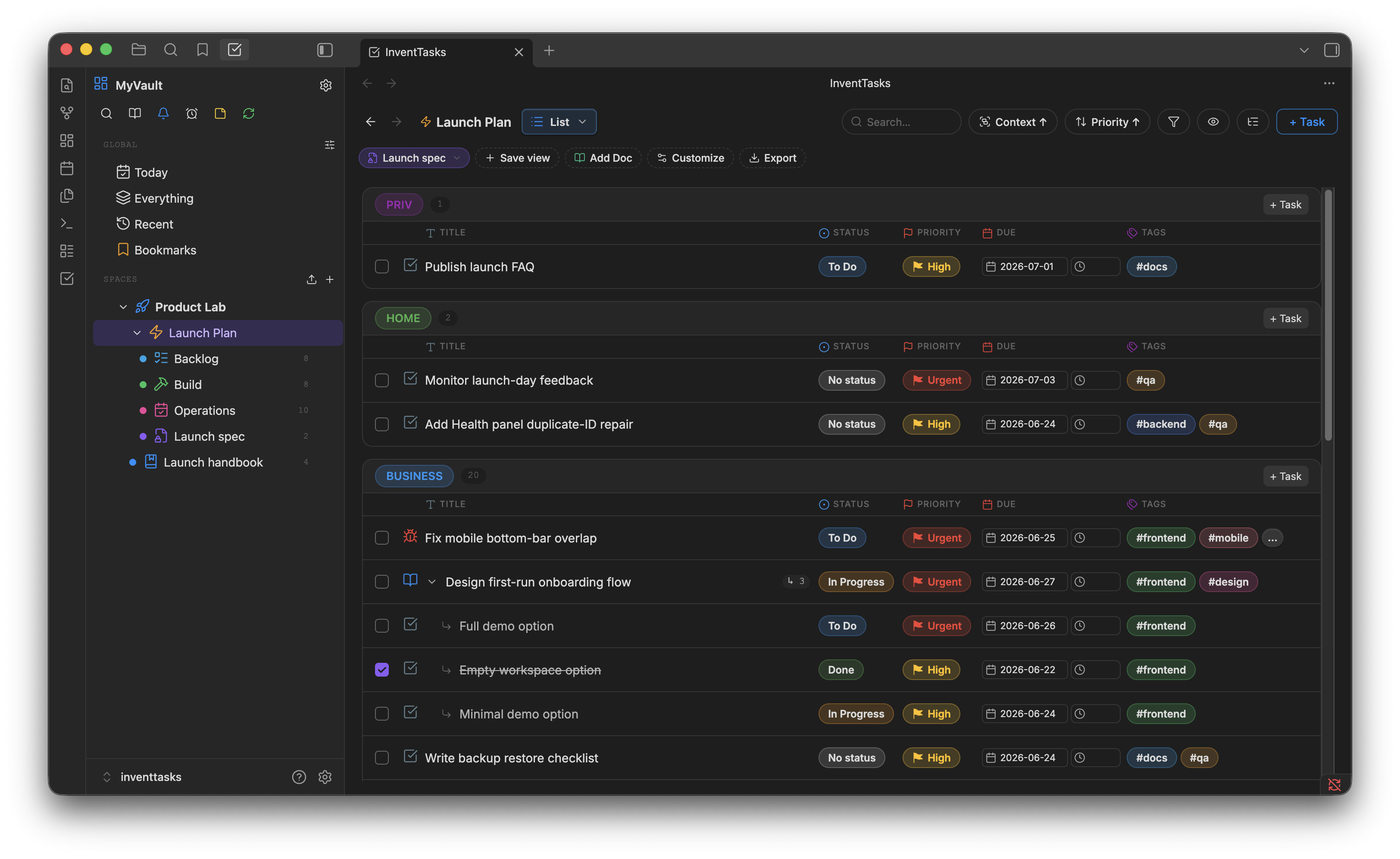
InventTasks makes a task a note rather than a line, a card or a row. The fields are typed and live in YAML frontmatter, and the board, the list, the calendar, the Gantt chart and the timeline are six views of that same note. Move a card and the due date, the status and every other view change with it, because there is only one object underneath.
That is the whole pitch, and it costs you two things worth stating: it is paid, and it is not open source — the code is public, but under an EULA, while all three plugins above are free and open source. It installs from Obsidian's community plugins just as they do. There is a free tier of 50 open tasks across 5 lists so you can test the model before paying.
If the free combination is working, keep it. It is genuinely good software made by people who gave it away. The case for changing is not that those plugins are bad — it is that keeping one thing in three shapes eventually costs more attention than the tooling saves.
Longer comparisons: Tasks in detail, the Kanban board model, and the whole alternatives set.