
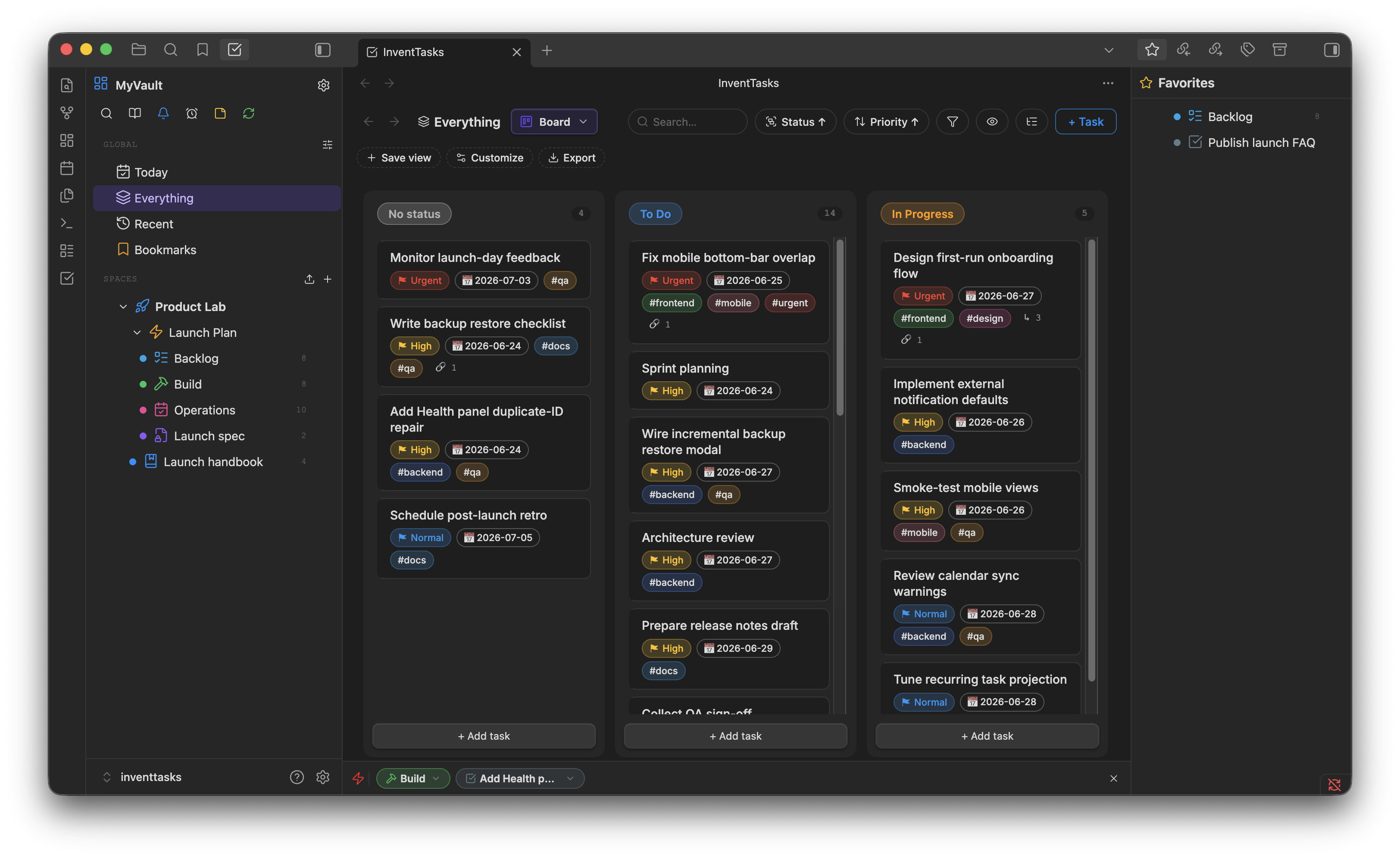
The typical Obsidian Kanban plugin stores the board as a single Markdown document with headings for columns and list items for cards. That works until you want a task to appear in two places, carry a due date, hold a description, or be found by search — at which point the document is the wrong shape and you are editing it by hand.
InventTasks does it the other way round. Each card is a note. The board is a
projection of those notes grouped by a field, usually status. Drag a card and
the note's status changes; nothing else moves.
What the board does#
- Columns from your own status set — the defaults are To do, In progress, Done and Complete, but statuses are configurable per workspace, Space, folder or list, with templates for Kanban, Scrum and simpler flows
- Drag and drop between columns, and reordering within a column
- Swimlanes — group rows by a second field, so you can see status × priority or status × assigned context at once
- Card fields you choose — show the dates, tags, progress or custom fields that matter to this board and hide the rest
- Filters and saved views — a filtered board ("this client, not done") saves as a named view you can return to or set as the default for that list
- Show closed as a toggle, so finished work is out of the way but one click from visible
Four status groups, any number of statuses#
Statuses belong to one of four groups: Not started, Active, Done, Closed. You can have as many statuses as you like inside them — Blocked, In review, Waiting on client — and the plugin still knows which of them mean "finished".
That distinction is what makes counts, filters and the free-plan allowance behave sensibly: a task in any Done or Closed status stops counting as open work, whatever you named the column.
The same tasks, five other ways#
The board is one of six views over one set of Items. The card you just dragged appears on the Gantt chart as a bar, in the Calendar on its due date, and in the Table as a row you can bulk-edit. Filters and grouping follow you between them.
Honest limits#
- Single-user by design. There are no assignees, no team roles, no
@mentionsand no simultaneous collaborative editing. This is a personal task manager. If you need a team board, use a team tool. - A board is not free of clutter by itself. With hundreds of open tasks the columns get long; that is what filters, swimlanes and per-list boards are for, but it is work you still have to do.
- Cards show a summary. Long descriptions live in the task, not on the card face — click through or open the note.
Where the data lives#
Every card is a Markdown file in your vault:
---
id: TSK-00107
title: Rewrite the onboarding email
status: in_review
priority: 1
tags: [marketing, q3]
due_date: 2026-09-30
---

The current one buries the download link below the fold.
Which means the board survives everything: Git history, grep, Obsidian's own
search, your own scripts, self-hosted sync — and the plugin being
uninstalled. The notes stay readable.
Coming from a board that lived on someone else's server? The rest of the mapping is on the ClickUp page.