
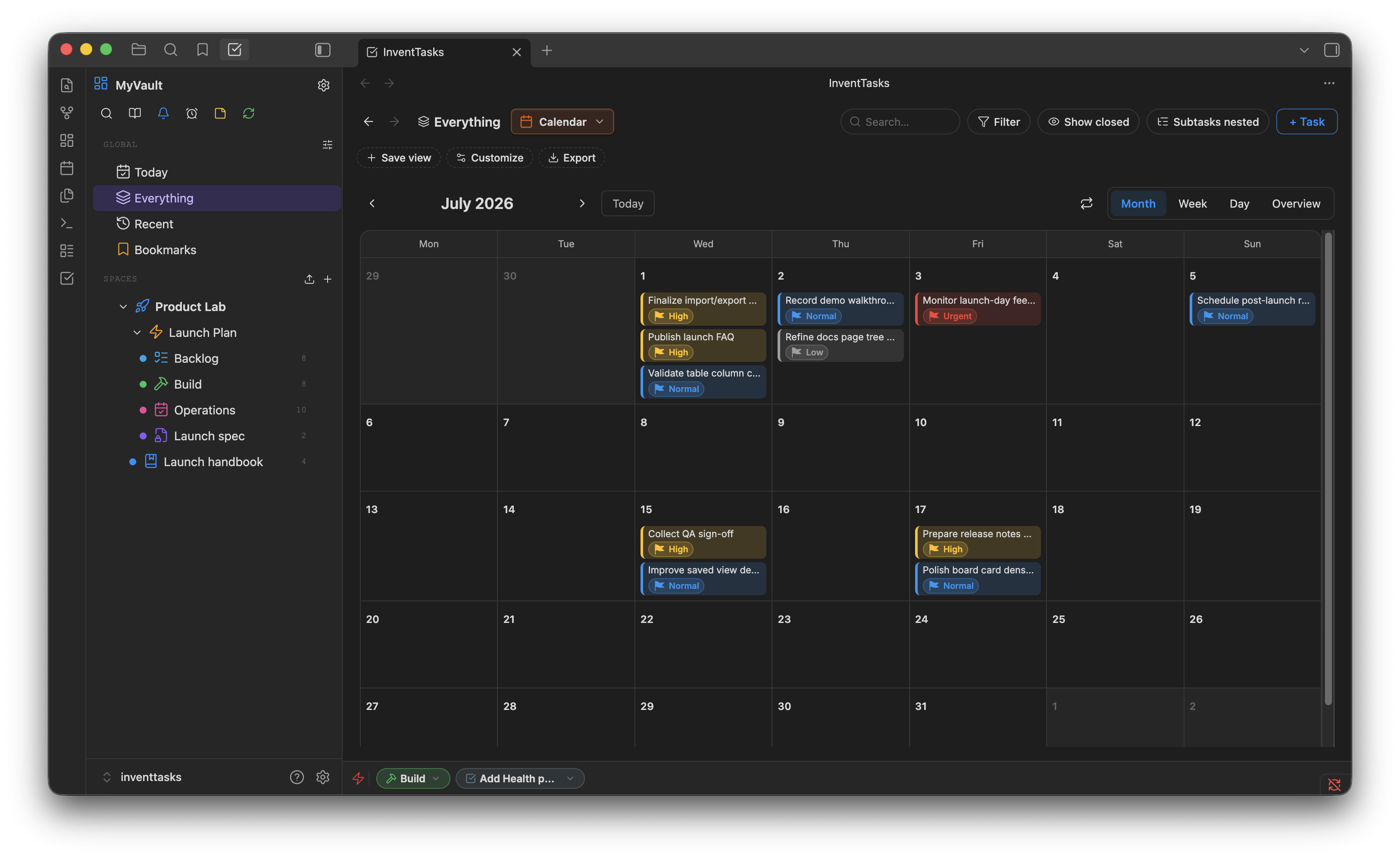
A list tells you what is unfinished. A calendar tells you what is about to hit you. InventTasks draws one from the same tasks — no second system, no copying dates between tools.
The calendar view, four ways#
- Month for the shape of the next few weeks
- Week and day for scheduling around actual hours
- Overview for a compact scan across a longer period
- Drag to reschedule any writable date field — the Markdown note updates as you drop it
- Colour by field — pills take their colour from status, priority, type or a custom field you choose
Recurring tasks are projected forward as virtual occurrences, so a weekly review shows up on every future week without creating dozens of notes. How far ahead is a setting, one to twelve months, three by default.
Pushing tasks to a real calendar#
Seeing tasks inside Obsidian only helps when Obsidian is open. InventTasks can publish them to the calendar you actually look at:
| Target | Setup |
|---|---|
| CalDAV | Server URL and credentials, with presets for Google, Outlook 365, iCloud, Nextcloud and Fastmail |
| ICS file | Writes _tasks-calendar.ics in the vault — subscribe to it from any calendar app |
Nothing syncs until you say what should. Calendar rules decide it: a rule is a name, a filter, one or more targets and a status policy — sync everything, exclude done and closed, or exclude closed only. Rules can sit at workspace, Space, folder or list level, so "client deadlines go to the work calendar, personal errands do not" is a rule, not a manual export.
Honest limits#
- The scheduler is desktop-only. Background calendar sync runs on desktop; configure it there. On mobile you see the results through whichever calendar app you subscribed with, which is usually what you wanted anyway.
- Outlook.com personal accounts do not support CalDAV. Use the ICS feed instead — this is a Microsoft limitation, not ours.
- Push, not merge. Tasks go out to your calendar. Events created in the calendar do not come back as tasks.
- A calendar app must be open to notify you. For alerts without that, use the plugin's own notifications — in-app, system or ntfy push.
Two-way with the rest of the plugin#
The calendar is one of six views over one set of Items. A task dragged to next Tuesday moves on the Gantt chart too, and shows its new date on the Kanban card. One edit, every view.
Where the data lives#
---
id: TSK-00218
title: Quarterly review
due_date: 2026-09-30
start_date: 2026-09-28
recurring:
  pattern: monthly
  ends: never
---
Ordinary frontmatter in an ordinary note. Sync it with your own server, keep it in Git, or read it with any editor.